
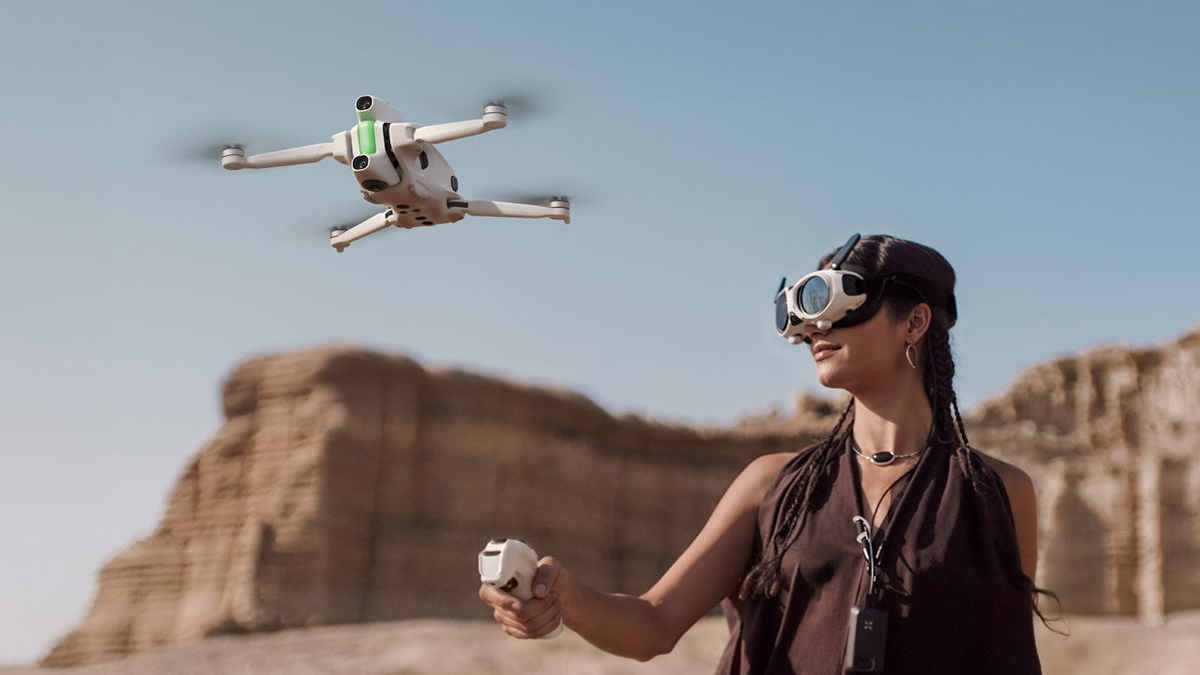
Dec 4th, 2025, saw the release of the world’s first 8K 360 drone—the Antigravity A1. It marks a massive departure from regular drones with front-facing cameras, and from the makeshift method of hoisting 360 cameras onto standard quadcopters.
Is it worth the hype? Should you splurge the R37,999 asking price or stick to the more traditional options?

The short answer is yes.
-
If you create aerial 360 content for VR headsets such as the Meta Quest 3, Apple Vision Pro, or Samsung Galaxy XR: Yes, you should splurge on this.
-
If you’re into virtual tour creation or real estate advertising: Yes, you should splurge on this.
-
If you’re an early adopter and like to toy with new technology: Yes, you should splurge on this.
Read on for a detailed breakdown of exactly how the Antigravity A1 stacks up against the competition.
1. 360 Capture vs. Directional Capture

The biggest difference? The camera system. Regular drones use a single, forward-facing camera mounted on a gimbal. To see something, you have to physically turn the drone.
The Antigravity A1 Difference:
-
Dual Fish-Eye Lenses: The A1 sports two lenses—one on top, one on the bottom. This allows for complete 360 capture. The drone captures everything around it, all the time.
-
The Invisible Drone: Through clever stitching algorithms, the A1 erases itself from the footage. You get a floating, disembodied perspective that looks like magic.
-
Fly First, Frame Later: With regular drones, you must compose your shot while flying. With the A1’s 8K360 footage, you simply fly. You can reframe the video in post-production to point in any direction you want, ensuring you never miss the action.
2. Controllers: Motion vs. Sticks

If you’re coming from a traditional background, the A1’s control scheme will feel like a paradigm shift. Regular drones typically rely on a "game controller" setup with two sticks—one for altitude/rotation, one for direction.
The Antigravity A1 Difference:
-
The Grip Controller: Forget dual sticks. The A1 ships with a joystick-style wand designed for intuitive, one-handed operation.
-
FreeMotion Mode: This is the game-changer. You control the drone by grabbing the trigger and pointing the controller where you want to go. Crucially, this mode decouples the flight direction from where you are looking. You can fly North while looking West inside the goggles.
-
FPV Mode: This offers a more traditional FPV feel, where the drone flies in the direction you tilt your wrist.
Note: While some users miss the precision of twin sticks, Antigravity has stated in their FAQ that they plan to release conventional drone controllers sometime in 2026.
3. The Vision Goggles Experience

Standard drones usually rely on your smartphone screen. FPV drones do use goggles, but they lock your view to the front of the drone.
The Antigravity A1 Difference:
-
Head Tracking: The Vision Goggles allow you to look around freely. Because the drone is capturing 360 degrees, you can turn your head to scan the horizon, regardless of where the drone is flying.
-
Immersion Level: It’s important to manage expectations here. While these are high-quality goggles, users have noted they are effectively a "magic window" rather than a full VR experience. The Field of View (FOV) is essentially a square aspect ratio (approx. 50° diagonal). You will see black space around the image, unlike the edge-to-edge immersion of a Quest 3.
-
Pass-Through: The goggles feature a black-and-white see-through mode to help you orient yourself without taking them off. Just be aware that for safety reasons, this view cannot be accessed while the drone is in certain active motion modes.
4. Hardware: Lenses and Landing Gear

Finally, the physical build is specifically engineered for the 360 workflow.
-
Retractable Landing Gear: To ensure the landing legs don't ruin your 360 shot, the A1 automatically retracts its gear upon takeoff and extends it for landing. Regular drones usually have fixed legs that get in the way.
-
Replaceable Lenses: Because the fish-eye lenses bulge out (and are prone to scratches), the A1 is designed with user-replaceable lens guards. This is a critical durability feature that many standard drones lack.
Verdict
The Antigravity A1 is not for everyone. It has its limitations:
-
It can only move in one direction (only forward, can’t reverse).
-
The single joystick controller is not everyone’s cup of tea.
-
You can get 360 footage by simply strapping a 360 camera to a regular drone.
-
Issues common with 360 cameras—such as stitching line errors and curved lens flare—need to be navigated.
-
Propeller shadows can cause flickers in the footage depending on the drone angle relative to the light source.

But its strengths are solid:
-
You get better 360 footage than with the Insta360 X5.
-
You get all the benefits that come with 360 capture.
-
Seamless 360 flight footage—no need to hack a 360 camera onto a drone.
-
The joystick is extremely intuitive to use.
-
Unmatched immersive aerial content creation: If you’re into tourism, map creation, or VR tour creation, this is a must-have.